Thursday, March 31, 2011

Learn Basics of Accounting in minutes

A few days back, I was looking for a brief introduction of accounting and basic principles of accounting. I' was looking  it on internet and found many reference books for accounting but there was only one which Im sharing here... Generally, internet search gives us maximum information and sometimes we don't need much. Today,  I found this great document which may help you in getting know-how of financial and cost accounting. 

https://docs.google.com/viewer?a=v&pid=explorer&chrome=true&srcid=1pkSpinXWeUxgul4zSAOnk_PKxps8HrsU-BWt6hobnuzhrEQGzZkqJqlN3T_1&hl=en

Cheears,

Saturday, February 12, 2011

Copy ALV Variants from one Program to another

Sometimes, ABAPers do not change program written by others if any changes to existing program requested to them. You can use the following program on production server to copy the ALV VARIANTS of one program to another program. The program is very useful because it will save your time of re-writing Variants.
 

*&---------------------------------------------------------------------*
*& Report  ZMI_ALV_LAYOUT_COPY                                         *
*&                                                                     *
*&---------------------------------------------------------------------*
*&                                                                     *
*&                                                                     *
*&---------------------------------------------------------------------*

REPORT  ZMI_ALV_LAYOUT_COPY                     .

* =====================================================================
* Data Declarations Section
* =====================================================================

* ---------------------------------------------------------------------
DATA : BEGIN OF MYLTDX OCCURS 0 .
INCLUDE STRUCTURE LTDX .
DATA : END OF MYLTDX .
* ---------------------------------------------------------------------
DATA : BEGIN OF MYLTDXT OCCURS 0 .
INCLUDE STRUCTURE LTDXT .
DATA : END OF MYLTDXT .
* ---------------------------------------------------------------------
DATA : BEGIN OF MYLTDXD OCCURS 0 .
INCLUDE STRUCTURE LTDXD .
DATA : END OF MYLTDXD .
* ---------------------------------------------------------------------

DATA : MANS(1) TYPE C .

DATA : PROGRAMM LIKE RS38M-PROGRAMM .
DATA : BEGIN OF MDYNPFIELDS OCCURS 1 .
INCLUDE STRUCTURE DYNPREAD .
DATA : END OF MDYNPFIELDS .
CONSTANTS BUTTONSELECTED(1) TYPE C VALUE 'X' .

* =====================================================================
* Macro for Inputing Filenames
* =====================================================================
DEFINE GET_FILENAME .
CALL FUNCTION 'WS_FILENAME_GET'
EXPORTING
* DEF_FILENAME = ' '
DEF_PATH = &1
MASK = ',*.*,*.*.'
MODE = '0'
* TITLE = ' '
IMPORTING
FILENAME = &2
* RC =
EXCEPTIONS
INV_WINSYS = 1
NO_BATCH = 2
SELECTION_CANCEL = 3
SELECTION_ERROR = 4
OTHERS = 5.

END-OF-DEFINITION .

* =====================================================================
* Macro for Downloading to ASCII Files
* =====================================================================
DEFINE DOWNLOAD_TO_ASCII .
CALL FUNCTION 'WS_DOWNLOAD'
EXPORTING
* BIN_FILESIZE = ' '
* CODEPAGE = ' '
FILENAME = &1
FILETYPE = 'DAT'
* MODE = ' '
* WK1_N_FORMAT = ' '
* WK1_N_SIZE = ' '
* WK1_T_FORMAT = ' '
* WK1_T_SIZE = ' '
* COL_SELECT = ' '
* COL_SELECTMASK = ' '
* NO_AUTH_CHECK = ' '
* IMPORTING
* FILELENGTH =
TABLES
DATA_TAB = &2
* FIELDNAMES =
EXCEPTIONS
FILE_OPEN_ERROR = 1
FILE_WRITE_ERROR = 2
INVALID_FILESIZE = 3
INVALID_TABLE_WIDTH = 4
INVALID_TYPE = 5
NO_BATCH = 6
UNKNOWN_ERROR = 7
GUI_REFUSE_FILETRANSFER = 8
OTHERS = 9.

END-OF-DEFINITION .

* =====================================================================
* Macro for uploading Data from ASCII files
* =====================================================================
DEFINE UPLOAD_FROM_ASCII .
CALL FUNCTION 'WS_UPLOAD'
EXPORTING
* CODEPAGE = ' '
FILENAME = &1
FILETYPE = 'DAT'
* HEADLEN = ' '
* LINE_EXIT = ' '
* TRUNCLEN = ' '
* USER_FORM = ' '
* USER_PROG = ' '
* IMPORTING
* FILELENGTH =
TABLES
DATA_TAB = &2
EXCEPTIONS
CONVERSION_ERROR = 1
FILE_OPEN_ERROR = 2
FILE_READ_ERROR = 3
INVALID_TABLE_WIDTH = 4
INVALID_TYPE = 5
NO_BATCH = 6
UNKNOWN_ERROR = 7
GUI_REFUSE_FILETRANSFER = 8
CUSTOMER_ERROR = 9
OTHERS = 10.
END-OF-DEFINITION .

* =====================================================================
* Selection Screen Default
* =====================================================================
PARAMETERS : P_FROM_P LIKE RS38M-PROGRAMM OBLIGATORY .
PARAMETERS : P_TO_P LIKE RS38M-PROGRAMM OBLIGATORY .
PARAMETERS : P_SAME_S RADIOBUTTON GROUP GRP1 DEFAULT 'X' .
PARAMETERS : P_DOWNLD RADIOBUTTON GROUP GRP1 .
PARAMETERS : P_UPLOAD RADIOBUTTON GROUP GRP1 .
PARAMETERS : P_FILE_x LIKE RLGRAP-FILENAME DEFAULT 'c:\LTDX.txt' .
PARAMETERS : P_FILE_t LIKE RLGRAP-FILENAME DEFAULT 'c:\LTDXT.txt' .
PARAMETERS : P_FILE_d LIKE RLGRAP-FILENAME DEFAULT 'c:\LTDXD.txt' .

* =====================================================================
* At Selection Screen Events
* =====================================================================
AT SELECTION-SCREEN .
PROGRAMM = P_FROM_P .

AT SELECTION-SCREEN ON VALUE-REQUEST FOR P_FILE_x .
GET_FILENAME 'c:\LTDX.txt' P_FILE_x .

AT SELECTION-SCREEN ON VALUE-REQUEST FOR P_FILE_t .
GET_FILENAME 'c:\LTDXT.txt' P_FILE_t .

AT SELECTION-SCREEN ON VALUE-REQUEST FOR P_FILE_d .
GET_FILENAME 'c:\LTDXD.txt' P_FILE_d .

AT SELECTION-SCREEN ON VALUE-REQUEST FOR P_FROM_P .
CLEAR MDYNPFIELDS . REFRESH MDYNPFIELDS .
MDYNPFIELDS-FIELDNAME = 'P_FROM_P' .
APPEND MDYNPFIELDS .
CALL FUNCTION 'DYNP_VALUES_READ'
EXPORTING
DYNAME = SY-CPROG
DYNUMB = SY-DYNNR
TABLES
DYNPFIELDS = MDYNPFIELDS
EXCEPTIONS
INVALID_ABAPWORKAREA = 1
INVALID_DYNPROFIELD = 2
INVALID_DYNPRONAME = 3
INVALID_DYNPRONUMMER = 4
INVALID_REQUEST = 5
NO_FIELDDESCRIPTION = 6
INVALID_PARAMETER = 7
UNDEFIND_ERROR = 8
DOUBLE_CONVERSION = 9
STEPL_NOT_FOUND = 10
OTHERS = 11.

READ TABLE MDYNPFIELDS INDEX 1 .
PROGRAMM = MDYNPFIELDS-FIELDVALUE .
CALL FUNCTION 'REPOSITORY_INFO_SYSTEM_F4'
EXPORTING
OBJECT_TYPE = 'PROG'
OBJECT_NAME = PROGRAMM
IMPORTING
OBJECT_NAME_SELECTED = PROGRAMM
EXCEPTIONS
CANCEL = 1
WRONG_TYPE = 2
OTHERS = 3.
P_FROM_P = PROGRAMM .

AT SELECTION-SCREEN ON VALUE-REQUEST FOR P_TO_P .
CLEAR MDYNPFIELDS . REFRESH MDYNPFIELDS .
MDYNPFIELDS-FIELDNAME = 'P_TO_P' .
APPEND MDYNPFIELDS .
CALL FUNCTION 'DYNP_VALUES_READ'
EXPORTING
DYNAME = SY-CPROG
DYNUMB = SY-DYNNR
TABLES
DYNPFIELDS = MDYNPFIELDS
EXCEPTIONS
INVALID_ABAPWORKAREA = 1
INVALID_DYNPROFIELD = 2
INVALID_DYNPRONAME = 3
INVALID_DYNPRONUMMER = 4
INVALID_REQUEST = 5
NO_FIELDDESCRIPTION = 6
INVALID_PARAMETER = 7
UNDEFIND_ERROR = 8
DOUBLE_CONVERSION = 9
STEPL_NOT_FOUND = 10
OTHERS = 11.

READ TABLE MDYNPFIELDS INDEX 1 .
PROGRAMM = MDYNPFIELDS-FIELDVALUE .
CALL FUNCTION 'REPOSITORY_INFO_SYSTEM_F4'
EXPORTING
OBJECT_TYPE = 'PROG'
OBJECT_NAME = PROGRAMM
IMPORTING
OBJECT_NAME_SELECTED = PROGRAMM
EXCEPTIONS
CANCEL = 1
WRONG_TYPE = 2
OTHERS = 3.
P_TO_P = PROGRAMM .

* =====================================================================
* Start of Selection
* =====================================================================
START-OF-SELECTION .
CASE BUTTONSELECTED.
WHEN P_SAME_S .
PERFORM COPY_FROM_PROG_TO_PROG .
WHEN P_DOWNLD .
PERFORM VDOWNLOAD .
WHEN P_UPLOAD .
PERFORM VUPLOAD .
ENDCASE .

*&---------------------------------------------------------------------*
*& Form COPY_FROM_PROG_TO_PROG
*&---------------------------------------------------------------------*
* text
*----------------------------------------------------------------------*
* --> p1 text
* <-- p2 text
*----------------------------------------------------------------------*
FORM COPY_FROM_PROG_TO_PROG.

CALL FUNCTION 'POPUP_TO_CONFIRM_STEP'
EXPORTING
* DEFAULTOPTION = 'Y'
TEXTLINE1 = 'Are you sure you want to copy Variants ? '
* TEXTLINE2 = ' '
TITEL = 'Confirmation '
* START_COLUMN = 25
* START_ROW = 6
* CANCEL_DISPLAY = 'X'
IMPORTING
ANSWER = MANS
EXCEPTIONS
OTHERS = 1.

IF MANS = 'J' .
* ---------------------------------------------------------------------
REFRESH MYLTDX . CLEAR MYLTDX .
SELECT * FROM LTDX INTO TABLE MYLTDX
WHERE REPORT = P_FROM_P.
LOOP AT MYLTDX .
MYLTDX-REPORT = P_TO_P .
MODIFY MYLTDX .
ENDLOOP .
IF SY-SUBRC = 0 .
DELETE FROM LTDX WHERE REPORT = P_TO_P .
INSERT LTDX FROM TABLE MYLTDX .
ENDIF .
* ---------------------------------------------------------------------
REFRESH MYLTDXT . CLEAR MYLTDXT .
SELECT * FROM LTDXT INTO TABLE MYLTDXT
WHERE REPORT = P_FROM_P.
LOOP AT MYLTDXT .
MYLTDXT-REPORT = P_TO_P .
MODIFY MYLTDXT .
ENDLOOP .
IF SY-SUBRC = 0 .
DELETE FROM LTDXT WHERE REPORT = P_TO_P .
INSERT LTDXT FROM TABLE MYLTDXT .
ENDIF .
* ---------------------------------------------------------------------
REFRESH MYLTDXT . CLEAR MYLTDXT .
SELECT * FROM LTDXT INTO TABLE MYLTDXT
WHERE REPORT = P_FROM_P.
LOOP AT MYLTDXT .
MYLTDXT-REPORT = P_TO_P .
MODIFY MYLTDXT .
ENDLOOP .
IF SY-SUBRC = 0 .
DELETE FROM LTDXT WHERE REPORT = P_TO_P .
INSERT LTDXT FROM TABLE MYLTDXT .
ENDIF .
* ---------------------------------------------------------------------
ENDIF .

ENDFORM. " COPY_FROM_PROG_TO_PROG

*&---------------------------------------------------------------------*
*& Form VDOWNLOAD
*&---------------------------------------------------------------------*
* text
*----------------------------------------------------------------------*
* --> p1 text
* <-- p2 text
*----------------------------------------------------------------------*
FORM VDOWNLOAD.
REFRESH MYLTDX . CLEAR MYLTDX .
SELECT * FROM LTDX INTO TABLE MYLTDX
WHERE REPORT = P_FROM_p.
DOWNLOAD_TO_ASCII P_FILE_x MYLTDX .

* ---------------------------------------------------------------------
REFRESH MYLTDXT . CLEAR MYLTDXT .
SELECT * FROM LTDXT INTO TABLE MYLTDXT
WHERE REPORT = P_FROM_P.
DOWNLOAD_TO_ASCII P_FILE_t MYLTDXT .

* ---------------------------------------------------------------------
REFRESH MYLTDXT . CLEAR MYLTDXT .
SELECT * FROM LTDXD INTO TABLE MYLTDXT
WHERE REPORT = P_FROM_P.
DOWNLOAD_TO_ASCII P_FILE_d MYLTDXT .

* ---------------------------------------------------------------------

ENDFORM. " VDOWNLOAD

*&---------------------------------------------------------------------*
*& Form VUPLOAD
*&---------------------------------------------------------------------*
* text
*----------------------------------------------------------------------*
* --> p1 text
* <-- p2 text
*----------------------------------------------------------------------*
FORM VUPLOAD.
CALL FUNCTION 'POPUP_TO_CONFIRM_STEP'
EXPORTING
* DEFAULTOPTION = 'Y'
TEXTLINE1 =
'Are you sure you want to upload Variants ? '
* TEXTLINE2 = ' '
TITEL = 'Confirmation '
* START_COLUMN = 25
* START_ROW = 6
* CANCEL_DISPLAY = 'X'
IMPORTING
ANSWER = MANS
EXCEPTIONS
OTHERS = 1.

IF MANS = 'J' .
* ---------------------------------------------------------------------
REFRESH MYLTDX . CLEAR MYLTDX .
UPLOAD_FROM_ASCII P_FILE_x MYLTDX .
LOOP AT MYLTDX .
MYLTDX-REPORT = P_TO_P .
MODIFY MYLTDX .
ENDLOOP .
IF SY-SUBRC = 0 .
DELETE FROM LTDX WHERE REPORT = P_TO_P .
INSERT LTDX FROM TABLE MYLTDX .
ENDIF .
* ---------------------------------------------------------------------
REFRESH MYLTDXT . CLEAR MYLTDXT .
UPLOAD_FROM_ASCII P_FILE_t MYLTDXT .
LOOP AT MYLTDXT .
MYLTDXT-REPORT = P_TO_P .
MODIFY MYLTDXT .
ENDLOOP .
IF SY-SUBRC = 0 .
DELETE FROM LTDXT WHERE REPORT = P_TO_P .
INSERT LTDXT FROM TABLE MYLTDXT .
ENDIF .
* ---------------------------------------------------------------------
REFRESH MYLTDXD . CLEAR MYLTDXD .
UPLOAD_FROM_ASCII P_FILE_d MYLTDXT .
LOOP AT MYLTDXT .
MYLTDXT-REPORT = P_TO_P .
MODIFY MYLTDXT .
ENDLOOP .
IF SY-SUBRC = 0 .
DELETE FROM LTDXT WHERE REPORT = P_TO_P .
INSERT LTDXT FROM TABLE MYLTDXT .
ENDIF .
* ---------------------------------------------------------------------
ENDIF .

ENDFORM. " VUPLOAD

Thursday, January 27, 2011

Franchise Software Dedicated Blog Now Available

Dear readers and friends; I've started a dedicated blog for Franchise software. The upcoming updates of Franchise software will  be only available at the following blog

http://franchise-omni.blogspot.com/

Thank you for your time and attention...

Wednesday, January 26, 2011

Franchise Release 2

Please the following link to download the latest build of Franchise software. You must installed the prerequisites of Franchise for proper working.

 http://rapidshare.com/files/444585264/FranchiseSetup__2_.rar

This release includes:

New Features:
  • btr1: Agent Fund Movement Transactions Report Added
Bugs addressed in this release:
  1. Mobile Number were not changeable while paying bills
  2. Agent Fund Movement remote transaction id were not recording
  3. Utility Bill Master Form were not showing properly

Monday, January 24, 2011

Franchise Demo: Utility Bill Payment Procedure

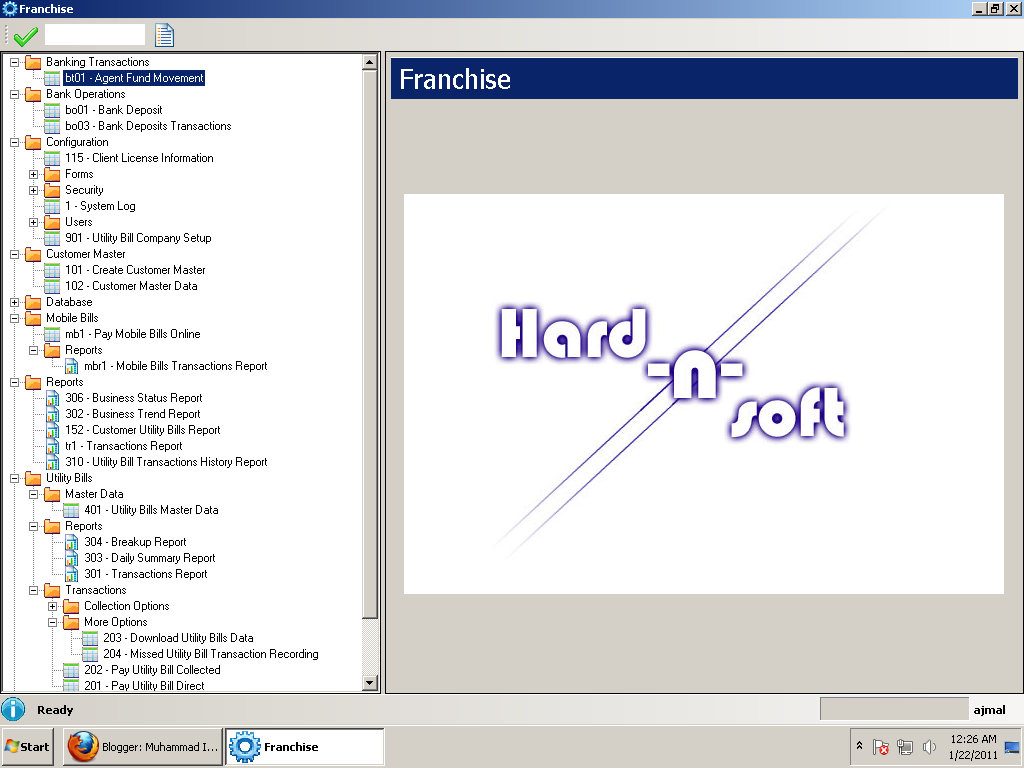
Type: 201 in the top textbox and enter or navigate through menu as follows:
Utility Bills > Transactions > 201 Utility Bill Payment Direct


Select you omni account id and provide mobile number and click on Connect button.
System will ask for password. Provide your omni password and press enter and wait for system load your account details and balance.

Select Company from the list and provide consumer account number and press enter key. System will load utility bill data and ask wait for your action either cancel or pay it.

Now press space key or click on pay button. System will confirm your action and proceed to complete the transaction.


Saturday, January 22, 2011

Franchise Softawre Setup & Configuration

http://rapidshare.com/files/443810111/FranchiseSetup.rar

Franchise software is built on dotnet 3.5 SP1. Before installing franchise you must have this component installed on your PC.

You can download dotnet 3.5 SP1 from Microsoft website or google it.
http://www.microsoft.com/downloads/en/details.aspx?FamilyID=ab99342f-5d1a-413d-8319-81da479ab0d7&displaylang=en

Other software packages as prerequisites.
The following files need to be installed for proper software function before using Franchise software.
  • http://rapidshare.com/#!download|351l3|89049728|CRRedist2008_x86.msi|17964
  • http://codecentrix.com/files/TwebstPro.exe
  • http://www.microsoft.com/downloads/en/details.aspx?familyid=889482fc-5f56-4a38-b838-de776fd4138c&displaylang=en
  • http://www.mediafire.com/?dyyzjmjn2zw

Friday, January 21, 2011

Franchise Release 1

Franchise is a small desktop application which is specially designed for the UBL Omni Agents. This application will serve agents with quick user interface and multiple financial and history offline reports.


Franchise software currently support online transactions:
  1. Utility Bill Payment
  2. Voucher Purchase
  3. Mobile Bills Payment
  4. Agent Fund Movement
Franchise made it very easy to grow your business incredibly faster via faster online transactions with tracking supports. All the transactions are logged into small desktop database for reporting purposes and available all the time for offline reporting.
Users of Franchise can use these reports for statistical and historical analysis. Franchise also includes a few graphical reports for trends and overall transactions status.

Sample Reports:


Follow the blog for more updates.